Security matters a lot in DevOps environments, where CI/CD pipelines and cloud infrastructure drive software delivery. One model that’s changing how teams approach security is Zero Trust. This article covers Zero Trust in the context of DevOps pipelines, with a focus on practical AWS tools, IAM, VPC endpoints, and micro-segmentation strategies.
What is Zero Trust and why should you care?
Zero Trust is a security framework based on the principle: never trust, always verify. Unlike traditional security models that rely on a secure perimeter, Zero Trust assumes that every request, whether from inside or outside your network, must be authenticated and authorized.
Why Zero Trust matters in DevOps:
- Modern CI/CD pipelines and cloud infrastructures (like AWS) are dynamic, so Zero Trust verifies every interaction no matter where it came from.
- Strict IAM policies and automated security rule checks hold access down to the minimum necessary, which is what protects critical assets.
- Micro-segmentation in AWS environments limits lateral movement, so a breach does less damage.
How does Zero Trust fit into CI/CD pipelines?
What does Zero Trust do in your CI/CD workflow?
CI/CD pipelines automate the process of code building, testing, and deployment. Without strong security, vulnerabilities may creep into production. Zero Trust addresses this by:
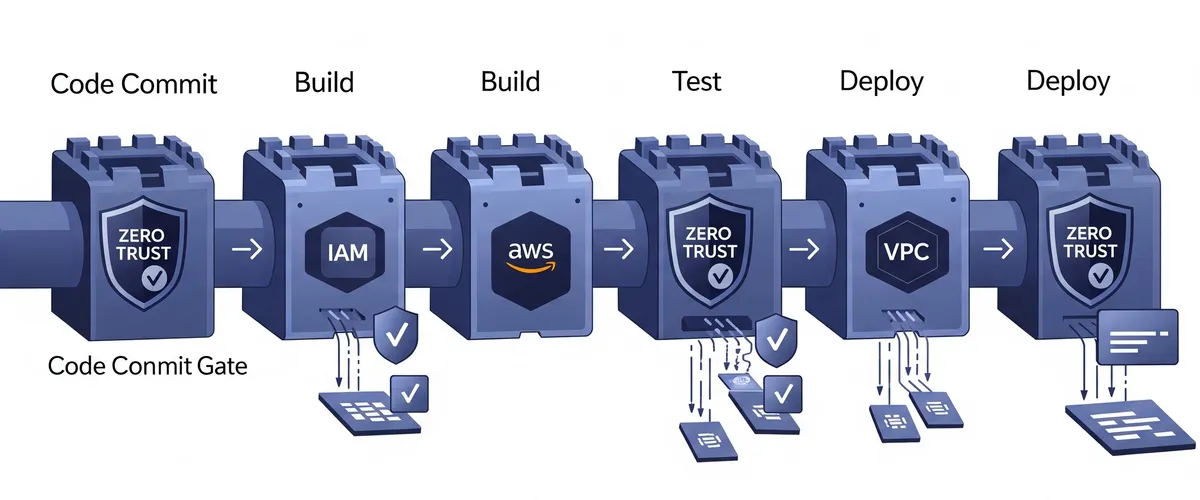
- Verifying every step in the pipeline, from code commit to deployment. Those checks are your Zero Trust security gates.
- Granting only essential permissions. If an attacker compromises one segment, they won’t have unrestricted access.
- Running automated scans and vulnerability assessments to catch issues before they escalate.
Apply Zero Trust principles and every request into your CI/CD pipeline is authenticated, so only trusted code gets deployed.
How can you implement Zero Trust in your DevOps pipeline?
What are the main components for Zero Trust in DevOps?
Implementing Zero Trust takes a mix of tools, processes, and new habits. Here’s how you can start:
1. AWS IAM for granular access control
Use AWS-native Zero Trust tools such as IAM to enforce the principle of least privilege. Every user and service should have only the access they need.
2. VPC endpoints for secure connectivity
Configure VPC endpoints to keep traffic between your VPC and AWS services private, so data never traverses the public internet.
3. Micro-segmentation in AWS environments
Think of micro-segmentation as locking each room in a house rather than just the front door. It restricts lateral movement, so even if one segment is compromised, others remain secure.
4. Automated security rule checks in CI/CD pipelines
Integrate automated vulnerability scans (using tools like Snyk) into your pipeline to enforce continuous verification.
5. Zero Trust CI/CD security gates
Incorporate security checks at each stage of the pipeline, from code commit to deployment, to catch any anomaly early.
What are the benefits of adopting Zero Trust in DevOps?
How does Zero Trust strengthen security?
- Granular access control: strict IAM policies keep users and services on minimal access, which shrinks the attack surface.
- Reduced attack surface: VPC endpoints keep sensitive communications internal, out of reach of external threats.
- Continuous monitoring: automated security checks find vulnerabilities quickly so they can be fixed quickly.
- Adaptive authentication: even if credentials are compromised, there is another verification step in the way.
Can Zero Trust improve efficiency?
Yes. Though adopting Zero Trust might seem complex initially, it simplifies your security processes over time:
- Faster response times: automated policies let you remediate vulnerabilities quickly.
- Developer confidence: with a secure pipeline, developers can focus on building features instead of chasing security concerns.
- Easier compliance: strict access controls and audit logs make regulatory requirements easier to meet.
Frequently Asked Questions (FAQs)
Zero Trust means treating every request as untrusted until it’s verified, regardless of its origin. It relies on continuous validation rather than assuming any part of your network is safe.
In DevOps, Zero Trust is applied at every pipeline stage. It enforces strict access controls using tools like AWS IAM, secures communication with VPC endpoints, and uses micro-segmentation to limit lateral movement.
No. While AWS provides good native tools for Zero Trust, the principles can be applied in any environment: cloud-based, on-premises, or hybrid.
The main tools are AWS IAM for managing permissions, VPC endpoints for secure connectivity, and automated security scanning tools like Snyk for vulnerability assessment.
By enforcing the principle of least privilege and continuously verifying access, even insiders only get limited permissions, which makes unauthorized actions easier to detect.
Start by gradually refactoring pipelines to integrate Zero Trust principles. Use API gateways to manage access to legacy systems, and adopt hybrid solutions like AWS Outposts to extend modern security practices to older environments.
Implementing Zero Trust in a CI/CD pipeline, step by step
Step 1: Assess your current environment
Begin by reviewing your existing CI/CD processes and infrastructure. Identify critical assets, the flow of sensitive data, and current access control mechanisms. Look for potential gaps where implicit trust may be present.
Step 2: Define your security policies
Establish clear security policies that align with Zero Trust principles. Decide on the minimum access rights for each role and define rules for how each component in your pipeline should interact.
Step 3: Configure AWS IAM
For cloud environments, configure IAM policies so that each user or service has only the access they need. For example:
{ "Version": "2012-10-17", "Statement": [ { "Effect": "Allow", "Action": "s3:ListBucket", "Resource": "arn:aws:s3:::your-bucket" }, { "Effect": "Allow", "Action": "s3:GetObject", "Resource": "arn:aws:s3:::your-bucket/*" } ]}This JSON policy limits access to a specific S3 bucket and is an example of applying the principle of least privilege.
Step 4: Secure network communication with VPC endpoints
Configure VPC endpoints so that traffic between your AWS resources stays within your private network. This reduces exposure to the public internet and strengthens security:
# AWS CLI command to create a VPC endpoint for S3aws ec2 create-vpc-endpoint --vpc-id VPC_ID --service-name com.amazonaws.REGION.s3 --route-table-ids RTB_IDStep 5: Enforce micro-segmentation
Segment your network to isolate critical services. Use tools like security groups, network ACLs, or service meshes to keep communication between different parts of your pipeline tightly controlled.
Step 6: Integrate automated security checks into CI/CD
Incorporate automated scanning tools into your CI/CD pipeline. For example, use a tool like Snyk or Aqua Security to scan your container images or code for vulnerabilities before deployment.
Step 7: Continuous monitoring and logging
Implement continuous monitoring to track access and usage patterns. Tools like AWS CloudTrail, Prometheus, and ELK stack can help you collect logs and detect anomalies, so every action is audited and verified.
Zero Trust best practices for DevOps pipelines
- Least privilege: always grant the minimum necessary permissions to every component in your pipeline.
- Multi-factor authentication (MFA): require MFA for accessing critical systems.
- Automated policy enforcement: use policy-as-code to validate your security configurations.
- Regular audits: perform periodic audits of IAM policies, network configurations, and access logs.
- Training and awareness: make sure your team knows the Zero Trust principles and follows secure practices.
Real-world case study: Zero Trust in a CI/CD pipeline
Imagine a mid-sized software company that deploys applications on AWS using a CI/CD pipeline. Initially, the company operated under the assumption that their internal network was secure. However, after experiencing a breach due to compromised credentials, they decided to implement a Zero Trust model.
The challenge
The company had a complex pipeline with multiple teams contributing code. Access control was loosely enforced, and once inside the network, attackers could move laterally without much resistance.
The solution
They implemented a Zero Trust architecture by:
- Revising IAM policies to enforce the least privilege.
- Setting up VPC endpoints to restrict external traffic.
- Segmenting their network using micro-segmentation techniques.
- Integrating automated security scans into their CI/CD pipeline.
- Implementing MFA and continuous monitoring.
The outcome
The result was a pipeline that was harder to break into and easier to audit. Security incidents dropped, and the team trusted their own deployment process more than they had before.
Avoid these Zero Trust mistakes
Even with the best intentions, implementing Zero Trust can be challenging. Here are some common pitfalls and how to avoid them:
- Overcomplicating IAM policies. Start with broader policies and refine them gradually rather than attempting overly granular rules from the start.
- Ignoring third-party integrations. Extend Zero Trust principles to external tools by using API authentication and secure integration methods.
- Neglecting legacy systems. Integrate them gradually using API gateways and hybrid cloud solutions, so you do not leave security gaps behind.
Conclusion
Zero Trust is a real change in how you secure a modern DevOps pipeline, not just a label. By applying Zero Trust principles to your CI/CD process using AWS IAM, VPC endpoints, and micro-segmentation, you cut risk and strengthen security. With continuous verification and automated security checks, your environment holds up better against both external and internal threats.
Start implementing Zero Trust today by assessing your current environment, defining strict security policies, and integrating these practices into your CI/CD pipelines. Those are the steps that protect your cloud-native workflows in practice.
References
- NIST Special Publication 800-207: Zero Trust Architecture, https://csrc.nist.gov/publications/detail/sp/800-207/final
- AWS Well-Architected Framework - Security Pillar, https://docs.aws.amazon.com/wellarchitected/latest/security-pillar/welcome.html
- AWS Identity and Access Management (IAM) Best Practices, https://docs.aws.amazon.com/IAM/latest/UserGuide/best-practices.html
- VPC Endpoints and VPC Endpoint Services - Amazon Virtual Private Cloud, https://docs.aws.amazon.com/vpc/latest/userguide/vpc-endpoints.html
- Implementing Microsegmentation with AWS Network Firewall, https://aws.amazon.com/blogs/networking-and-content-delivery/implementing-microsegmentation-with-aws-network-firewall/
- Securing CI/CD Pipelines - Cloud Security Alliance, https://cloudsecurityalliance.org/research/guidance/ (Note: Search for relevant CI/CD security documents on the CSA website)
- DevSecOps: Integrating Security into the DNA of Your DevOps Processes - SANS Institute, https://www.sans.org/white-papers/ (Note: Search for relevant DevSecOps papers on the SANS website)
- Zero Trust Security Model - Microsoft Docs, https://docs.microsoft.com/en-us/security/zero-trust/