---
title: "How to Install Apache Web Server on Amazon Linux 2"
lang: "en"
author: "Mohammad Abu Mattar"
canonical: https://mkabumattar.com/post/how-to-install-apache-web-server-on-amazon-linux-2
---
[Home](/)›[Blog](/blog)›[All Categories](/blog/categories)›[AWS](/blog/categories/aws)
Blog
[Prev in AWSHow to Install and Setup FireWall on Amazon Linux 2](/blog/post/how-to-install-and-setup-firewall-on-amazon-linux-2)[Next in AWSHow to Install PHP and MariaDB on Amazon Linux 2](/blog/post/how-to-install-php-and-mariadb-on-amazon-linux-2)
[AWS](/blog/categories/aws)[EC2](/blog/categories/ec2)[Apache](/blog/categories/apache)[Web Server](/blog/categories/web-server)[Linux](/blog/categories/linux)[Firewall](/blog/categories/firewall)
# How to Install Apache Web Server on Amazon Linux 2
[Mohammad Abu Mattar](/authors/mohammad-abu-mattar)Published: 24 Oct 202202 Mins read02 Mins listen
[Markdown for AI(opens in a new tab)](/post/how-to-install-apache-web-server-on-amazon-linux-2/index.md "Open the plain-Markdown version of this page, for pasting into an AI tool")
TL;DR
How to install the Apache web server on Amazon Linux 2, open HTTP through firewalld, and serve a simple HTML page from an EC2 instance.
Series
[Amazon Linux 2 LAMP Stack Setup](/series/amazon-linux-2-lamp-stack-setup)2/4
[PreviousHow to Install and Setup FireWall on Amazon Linux 2](/blog/post/how-to-install-and-setup-firewall-on-amazon-linux-2)[NextHow to Install PHP and MariaDB on Amazon Linux 2](/blog/post/how-to-install-php-and-mariadb-on-amazon-linux-2)
All posts in this series (4)
Blog4
1. [How to Install and Setup FireWall on Amazon Linux 2](/blog/post/how-to-install-and-setup-firewall-on-amazon-linux-2)
2. [How to Install Apache Web Server on Amazon Linux 2You are here](/blog/post/how-to-install-apache-web-server-on-amazon-linux-2)
3. [How to Install PHP and MariaDB on Amazon Linux 2](/blog/post/how-to-install-php-and-mariadb-on-amazon-linux-2)
4. [How to Install WordPress on Amazon Linux 2](/blog/post/how-to-install-wordpress-on-amazon-linux-2)
### How to Install Apache Web Server on Amazon Linux 2
Contents
[Introduction](#introduction)[Prerequisites](#prerequisites)[Install Apache web server and serve a simple HTML web page](#install-apache-web-server-and-serve-a-simple-html-web-page)[Step 1: install Apache web server](#step-1-install-apache-web-server)[Step 2: start Apache web server](#step-2-start-apache-web-server)[Step 3: configure the firewall](#step-3-configure-the-firewall)[Step 4: create a simple HTML web page](#step-4-create-a-simple-html-web-page)[Step 5: test Apache web server](#step-5-test-apache-web-server)[Conclusion](#conclusion)[References](#references)
## [Introduction](#introduction)
In this tutorial, we will learn how to install Apache web server on Amazon Linux 2. We will also learn how to configure Apache web server to serve a simple HTML web page.
## [Prerequisites](#prerequisites)
To follow this tutorial, you will need:
- An Amazon Linux 2 EC2 instance.
- A user with sudo privileges.
## [Install Apache web server and serve a simple HTML web page](#install-apache-web-server-and-serve-a-simple-html-web-page)
### [Step 1: install Apache web server](#step-1-install-apache-web-server)
Before we start, we need to update the package list and upgrade the installed packages:
Terminal window
```
1sudo yum update -y
```
Now, we can install Apache web server:
Terminal window
```
1sudo yum install httpd -y
```
### [Step 2: start Apache web server](#step-2-start-apache-web-server)
Now, we can start Apache web server:
Terminal window
```
1sudo systemctl start httpd
```
And configure Apache to run on system boot:
Terminal window
```
1sudo systemctl enable httpd
```
### [Step 3: configure the firewall](#step-3-configure-the-firewall)
Now, we need to configure the firewall to allow HTTP traffic:
Terminal window
```
1sudo firewall-cmd --permanent --add-service=http2sudo firewall-cmd --reload
```
### [Step 4: create a simple HTML web page](#step-4-create-a-simple-html-web-page)
Before we can test Apache web server, we need to change the permissions of the `/var/www/html` directory:
Terminal window
```
1sudo chmod 777 /var/www/html
```
Now, we can create a simple HTML web page:
Terminal window
```
1sudo vi /var/www/html/index.html
```
```
123 4 Apache Web Server5 6 7 Apache Web Server
8 This is a simple HTML web page.
9 10
```
### [Step 5: test Apache web server](#step-5-test-apache-web-server)
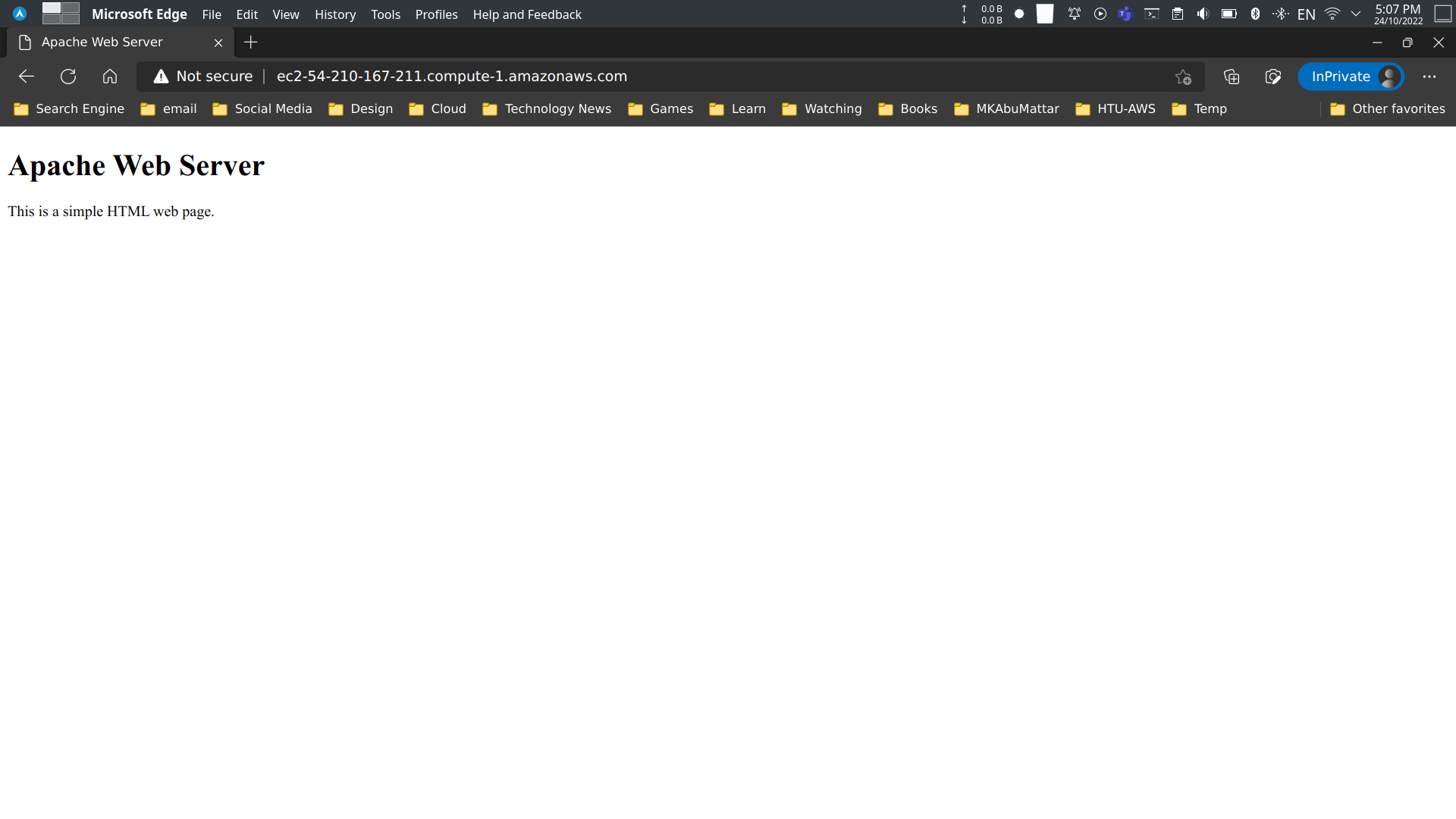
Now, we can test Apache web server by opening the public IP address of our Amazon Linux 2 EC2 instance in a web browser:
## [Conclusion](#conclusion)
In this tutorial, we learned how to install Apache web server on Amazon Linux 2. We also learned how to configure Apache web server to serve a simple HTML web page.
## [References](#references)
- [Apache HTTP Server Project Documentation](https://httpd.apache.org/docs/)
- [Amazon EC2 User Guide for Linux Instances](https://docs.aws.amazon.com/AWSEC2/latest/UserGuide/concepts.html)
- [Tutorial: Installing a LAMP Web Server on Amazon Linux 2](https://docs.aws.amazon.com/AWSEC2/latest/UserGuide/ec2-lamp-amazon-linux-2.html)
- [Firewalld Official Documentation](https://firewalld.org/documentation/)
- [Managing software on your Linux instance - AWS](https://docs.aws.amazon.com/AWSEC2/latest/UserGuide/managing-software.html)
- [Controlling Services with systemctl - Red Hat](https://access.redhat.com/documentation/en-us/red_hat_enterprise_linux/7/html/system_administrators_guide/sect-managing_services_with_systemd-services) (Amazon Linux is RHEL-based)
- [Using firewalld - Fedora Project Docs](https://docs.fedoraproject.org/en-US/quick-docs/firewalld/)
- [AWS - Amazon Linux 2 AMI Information](https://aws.amazon.com/amazon-linux-2/)
- [Previous Post: How to Install and Setup FireWall on Amazon Linux 2](/blog/post/how-to-install-and-setup-firewall-on-amazon-linux-2)
- [HTML Tutorial - W3Schools](https://www.w3schools.com/html/)
- [Vi Text Editor Tutorial](https://www.vim.org/docs.php)
Was this useful?
## Tags
[#Apache Installation](/blog/tags/apache-installation)[#Amazon Linux 2](/blog/tags/amazon-linux-2)[#HTTPD](/blog/tags/httpd)[#Firewalld](/blog/tags/firewalld)[#Web Server Setup](/blog/tags/web-server-setup)[#EC2 Setup](/blog/tags/ec2-setup)[#Linux Server](/blog/tags/linux-server)
## Share
[Facebook](https://facebook.com/sharer/sharer.php?u=https%3A%2F%2Fmkabumattar.com%2Fblog%2Fpost%2Fhow-to-install-apache-web-server-on-amazon-linux-2 "Share on Facebook")[Twitter](https://twitter.com/intent/tweet/?text=How%20to%20Install%20Apache%20Web%20Server%20on%20Amazon%20Linux%202&url=https%3A%2F%2Fmkabumattar.com%2Fblog%2Fpost%2Fhow-to-install-apache-web-server-on-amazon-linux-2 "Share on Twitter")[LinkedIn](https://www.linkedin.com/shareArticle?mini=true&url=https%3A%2F%2Fmkabumattar.com%2Fblog%2Fpost%2Fhow-to-install-apache-web-server-on-amazon-linux-2&title=How%20to%20Install%20Apache%20Web%20Server%20on%20Amazon%20Linux%202&summary=How%20to%20install%20the%20Apache%20web%20server%20on%20Amazon%20Linux%202%2C%20open%20HTTP%20through%20firewalld%2C%20and%20serve%20a%20simple%20HTML%20page%20from%20an%20EC2%20instance.&source=https://mkabumattar.com "Share on LinkedIn")[WhatsApp](https://wa.me/?text=How%20to%20Install%20Apache%20Web%20Server%20on%20Amazon%20Linux%202%20https%3A%2F%2Fmkabumattar.com%2Fblog%2Fpost%2Fhow-to-install-apache-web-server-on-amazon-linux-2 "Share on WhatsApp")[Telegram](https://t.me/share/url?url=https%3A%2F%2Fmkabumattar.com%2Fblog%2Fpost%2Fhow-to-install-apache-web-server-on-amazon-linux-2&text=How%20to%20Install%20Apache%20Web%20Server%20on%20Amazon%20Linux%202 "Share on Telegram")[Reddit](https://www.reddit.com/submit?url=https%3A%2F%2Fmkabumattar.com%2Fblog%2Fpost%2Fhow-to-install-apache-web-server-on-amazon-linux-2&title=How%20to%20Install%20Apache%20Web%20Server%20on%20Amazon%20Linux%202 "Share on Reddit")[Hacker News](http://news.ycombinator.com/submitlink?u=https%3A%2F%2Fmkabumattar.com%2Fblog%2Fpost%2Fhow-to-install-apache-web-server-on-amazon-linux-2&t=How%20to%20Install%20Apache%20Web%20Server%20on%20Amazon%20Linux%202 "Share on Hacker News")[Pinterest](https://pinterest.com/pin/create/button/?url=https%3A%2F%2Fmkabumattar.com%2Fblog%2Fpost%2Fhow-to-install-apache-web-server-on-amazon-linux-2&media=&description=How%20to%20install%20the%20Apache%20web%20server%20on%20Amazon%20Linux%202%2C%20open%20HTTP%20through%20firewalld%2C%20and%20serve%20a%20simple%20HTML%20page%20from%20an%20EC2%20instance. "Share on Pinterest")[Email]()
## Comments
## You might also enjoy
More posts on similar topics
[](/blog/post/how-to-install-and-setup-firewall-on-amazon-linux-2)
## [How to Install and Setup FireWall on Amazon Linux 2](/blog/post/how-to-install-and-setup-firewall-on-amazon-linux-2)
- [Mohammad Abu Mattar](/authors/mohammad-abu-mattar)
- [AWS](/blog/categories/aws)
- [EC2](/blog/categories/ec2)
- [Linux](/blog/categories/linux)
- [Firewall](/blog/categories/firewall)
- [Security](/blog/categories/security)
Introduction This tutorial covers installing and configuring firewalld on Amazon Linux 2, including setting the default zone and managing services and ports. Prerequisites To follow along wit
[#Firewalld](/blog/tags/firewalld)[#Amazon Linux 2](/blog/tags/amazon-linux-2)[#EC2 Security](/blog/tags/ec2-security)+5 tags
[read more](/blog/post/how-to-install-and-setup-firewall-on-amazon-linux-2)
[](/blog/post/how-to-install-php-and-mariadb-on-amazon-linux-2)
## [How to Install PHP and MariaDB on Amazon Linux 2](/blog/post/how-to-install-php-and-mariadb-on-amazon-linux-2)
- [Mohammad Abu Mattar](/authors/mohammad-abu-mattar)
- [AWS](/blog/categories/aws)
- [EC2](/blog/categories/ec2)
- [PHP](/blog/categories/php)
- [MariaDB](/blog/categories/mariadb)
- [Apache](/blog/categories/apache)
- [LAMP Stack](/blog/categories/lamp-stack)
- [Linux](/blog/categories/linux)
Introduction In this tutorial we will set up PHP and MariaDB on Amazon Linux 2. We will get PHP working with the Apache web server, secure the MariaDB install, and then connect the two with a smal
[#PHP Installation](/blog/tags/php-installation)[#MariaDB Installation](/blog/tags/mariadb-installation)[#Amazon Linux 2](/blog/tags/amazon-linux-2)+5 tags
[read more](/blog/post/how-to-install-php-and-mariadb-on-amazon-linux-2)
[](/blog/post/how-to-install-wordpress-on-amazon-linux-2)
## [How to Install WordPress on Amazon Linux 2](/blog/post/how-to-install-wordpress-on-amazon-linux-2)
- [Mohammad Abu Mattar](/authors/mohammad-abu-mattar)
- [AWS](/blog/categories/aws)
- [EC2](/blog/categories/ec2)
- [WordPress](/blog/categories/wordpress)
- [LAMP Stack](/blog/categories/lamp-stack)
- [Linux](/blog/categories/linux)
Introduction This tutorial installs WordPress on Amazon Linux 2 and configures it to run with Apache, PHP, and MariaDB. Prerequisites To follow along with this tutorial, you will need:An
[#WordPress Installation](/blog/tags/wordpress-installation)[#Amazon Linux 2](/blog/tags/amazon-linux-2)[#Apache Setup](/blog/tags/apache-setup)+5 tags
[read more](/blog/post/how-to-install-wordpress-on-amazon-linux-2)
[](/blog/post/how-to-run-an-apache-web-server-using-docker-on-an-aws-ec2-instance)
## [How to Run an Apache Web Server Using Docker on an AWS EC2 Instance](/blog/post/how-to-run-an-apache-web-server-using-docker-on-an-aws-ec2-instance)
- [Mohammad Abu Mattar](/authors/mohammad-abu-mattar)
- [AWS](/blog/categories/aws)
- [EC2](/blog/categories/ec2)
- [Docker](/blog/categories/docker)
- [Apache](/blog/categories/apache)
- [Web Server](/blog/categories/web-server)
Introduction In this post, we will learn how to run an Apache web server using Docker on an AWS EC2 instance. We will use the following tools:AWS EC2 \[Docker\](
[#AWS EC2 Docker](/blog/tags/aws-ec2-docker)[#Apache Docker](/blog/tags/apache-docker)[#Containerization](/blog/tags/containerization)+4 tags
[read more](/blog/post/how-to-run-an-apache-web-server-using-docker-on-an-aws-ec2-instance)
[](/blog/post/how-to-install-and-configure-nodejs-on-ec2-instance-amazon-linux-2)
## [How to Install and Configure Node.js on EC2 Instance Amazon Linux 2](/blog/post/how-to-install-and-configure-nodejs-on-ec2-instance-amazon-linux-2)
- [Mohammad Abu Mattar](/authors/mohammad-abu-mattar)
- [AWS](/blog/categories/aws)
- [EC2](/blog/categories/ec2)
- [Node.js](/blog/categories/nodejs)
- [Linux](/blog/categories/linux)
Introduction Node.js does not exist in the default Amazon Linux 2 repository. So, we need to add the Node.js repository to the system. In this post, we will learn how to install and configure Node
[#Node.js Installation](/blog/tags/nodejs-installation)[#Amazon Linux 2](/blog/tags/amazon-linux-2)[#AWS EC2 Setup](/blog/tags/aws-ec2-setup)+3 tags
[read more](/blog/post/how-to-install-and-configure-nodejs-on-ec2-instance-amazon-linux-2)
[](/blog/post/how-to-create-an-aws-ec2-instance-using-aws-cli)
## [How To Create An AWS EC2 Instance Using AWS CLI](/blog/post/how-to-create-an-aws-ec2-instance-using-aws-cli)
- [Mohammad Abu Mattar](/authors/mohammad-abu-mattar)
- [AWS](/blog/categories/aws)
- [EC2](/blog/categories/ec2)
- [VPC](/blog/categories/vpc)
- [AWS CLI](/blog/categories/aws-cli)
- [WordPress](/blog/categories/wordpress)
- [Linux](/blog/categories/linux)
Introduction In this tutorial we will create an AWS EC2 instance with the AWS CLI. We will build the network around it first, then launch the instance with a user data script that installs the Apa
[#AWS CLI EC2](/blog/tags/aws-cli-ec2)[#AWS CLI VPC](/blog/tags/aws-cli-vpc)[#VPC Configuration](/blog/tags/vpc-configuration)+8 tags
[read more](/blog/post/how-to-create-an-aws-ec2-instance-using-aws-cli)
6 related posts